

English is YouTube's #1 language by revenue and reach. Translating one 10-minute video costs $0.03–0.33 and pays off after 50–200 views from an English-speaking audience.
🚀 Launch @janustranslate_botWhy translate videos to English in 2026
Open YouTube Studio → "Analytics" → "Audience" → "Top geographies". A typical English-speaking channel sees approximately this distribution:
| Audience country | Share of views | RPM (USD per 1000 views) |
|---|---|---|
| USA | 30–50% | $4 – $12 |
| UK / Canada / Australia | 15–25% | $5 – $10 |
| Germany, Nordic countries | 5–10% | $5 – $14 |
| India, Pakistan, Philippines | 10–20% | $0.5 – $2 |
| Latin America, Spain | 5–15% | $2 – $4 |
Conclusion: even adding English subtitles to a Russian/Spanish/Hindi channel can double or triple ad revenue because the algorithm starts surfacing your video to high-CPM countries.
Method 1. YouTube auto-translate subtitles (free)
YouTube generates subtitles in the original language (speech recognition), then offers viewers an "auto-translate → English" option in the player.
How to enable
- Open your video on YouTube
- Settings gear → "Subtitles" → "Auto (English)"
- Done
Pros
- Free and instant
- No action from the creator required
Cons
- Quality is very low for Russian/Hindi/Spanish with background noise, music, or accents
- Not indexed by YouTube search – the algorithm does NOT know your video has an English version
- Not shown in metadata – title and description stay in the original language
- Botches niche terms: "sour cream" becomes "sour milk", domain-specific words get mangled
Who should use this
Nobody serious about growth. This is a "better than nothing" mode for one-off viewers.
Method 2. Manual subtitle upload via YouTube Studio
You translate yourself (via DeepL/ChatGPT/any translator), save as .srt or .vtt, and upload as official English subtitles. In parallel – translate title and description.
Pros
- Full "real" subtitles – indexed by YouTube
- You can manually edit timecodes and text
- Title and description also translated
Cons
- Hours of work per video (reading original, translating, aligning timecodes)
- For a channel with 50 videos, this is 2-3 weeks of full-time work
- DeepL has semantic errors – the bot doesn't know your niche context
Method 3. DeepL + manual paste (for one-off cases)
DeepL is the highest-quality consumer translator in 2026, noticeably better than Google Translate for many language pairs.
Pros
- Significantly better translation quality than Google
- Free up to 500,000 characters per month (Pro – €8/mo)
- Works for most everyday topics
Cons
- Doesn't understand cooking/technical/jargon terms
- Still requires manual timecode alignment
- Does not publish translations to Studio – still manual work
Method 4. Speech-to-text services (Whisper, Sonix, Notta)
Whisper (OpenAI), Sonix.ai, Notta, and Descript transcribe video speech to text and immediately translate to your target language.
Pros
- Best transcription quality (Whisper in 2026 is 95-98% accuracy even with noise)
- Can bypass Studio entirely
- Free via Whisper API (if you can code)
Cons
- Sonix/Notta are paid ($10-30/mo), Whisper requires technical skills
- Subtitles translation exists, but doesn't auto-publish to Studio
- Doesn't translate title and description
Method 5. JanusTranslate – Telegram bot with auto-publish (our service) ⭐
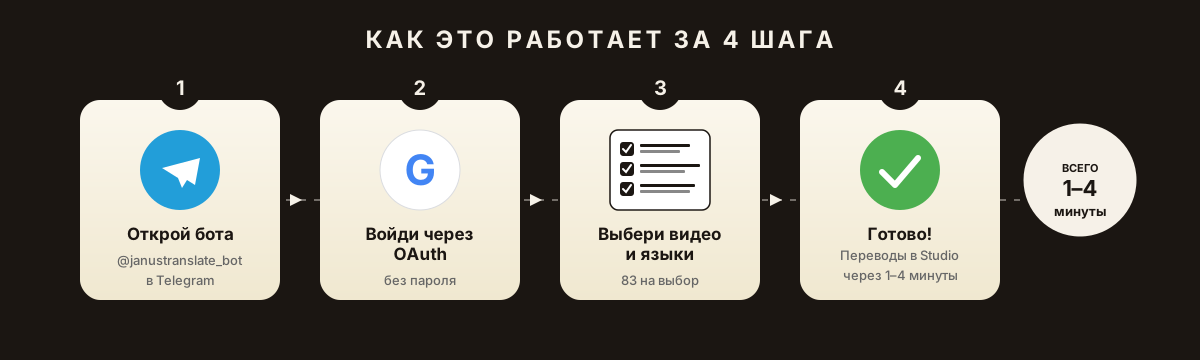
How it works:
- Open @janustranslate_bot in Telegram
- Authorize via Google OAuth (no password – just permission to read video list and publish translations)
- Pick a video + languages + mode (Express / AI Lite / Smart / Premium AI)
- Bot shows exact price → confirm
- Within 1-4 minutes – translations are already in YouTube Studio – subtitles, title and description
Pros
- Full automation – you never open YouTube Studio
- Translates subtitles + title + description simultaneously
- 82 languages – Spanish, German, French, Polish, Turkish, Arabic, Japanese, Korean, etc.
- 4 quality modes – from cheap machine translation to Premium AI "almost human"
- Pay-per-result – no subscriptions, credits never expire
- The 100 demo credits are for Express. AI modes unlock after the first top-up; usage depends on the selected actions and languages.
- Works directly in Telegram – no need to install apps
- Safe – OAuth doesn't transfer your password
Cons
- Paid beyond the free 100 credits ($15 for 3400 credits in the starter pack)
- No custom training on brand terminology (like enterprise tools)
How much it actually costs
Typical 10-minute video with ~6500 subtitle characters:
- Express: 1 credit per language for subtitles, plus 1 per language for title and description. AI subtitle cost depends on text volume; check the actual quote before starting.
- AI Lite (better quality): ~15 credits = $0.07
- Premium AI (top quality): ~75 credits = $0.33
So translating one video to English costs $0.03–0.33 depending on quality. A 50-video channel = $1.50-16.50 for full localization.
Method 6. Rask.ai / VEED / Sonix – web platforms
Big web platforms for AI translation and dubbing.
Pros
- In addition to subtitles, they do AI voiceover (important if you want full dub)
- Convenient web editor
- Large language set (130-140+)
Cons
- Don't auto-upload to YouTube Studio – you have to download .srt and upload manually
- Subscription model – Rask from $20/mo, VEED from $18/mo. Pay even when not using
- Don't translate video metadata (title, description, tags)
- Voiceover requires separate credits
Method 7. Professional human translator
Find a translator on Fiverr / Upwork with subtitle-creation skills.
Pros
- Best quality – accounts for cultural nuances, jokes, niches
- Can localize (not just translate – replace cultural references)
Cons
- Expensive – $20-50 per 10-minute video
- Slow – 1-3 days per video
- You still need to manually upload to Studio
Comparison of all 7 methods
| Method | Speed | Quality | Price/video | Auto-publish | Translates metadata |
|---|---|---|---|---|---|
| 1. YouTube auto-translate | Instant | Very low | Free | ❌ (player only) | ❌ |
| 2. Manual upload | 2-4 hours | Your English | Free | ✅ manual | ✅ manual |
| 3. DeepL + manual | 30-60 min | Good | Free/€8/mo | ✅ manual | ✅ manual |
| 4. Whisper/Sonix/Notta | 10-30 min | Good | $0-30/mo | ❌ | ❌ |
| 5. JanusTranslate | 1-4 min | High (4 modes) | $0.03-0.33 | ✅ auto | ✅ auto |
| 6. Rask.ai / VEED | 10-30 min | Very high (dub) | $20+/mo | ❌ | ❌ |
| 7. Human translator | 1-3 days | Maximum | $20-50 | ❌ | ✅ manual |
Which method to pick for your task
- If you have 1-3 videos and want to save money: Method 3 (DeepL + manual). 1 hour per video, free.
- If you have 10-100 videos and need bulk translation: Method 5 (JanusTranslate). One day to translate and publish entire channel to 5 languages. $5-30 total.
- If you need professional voice dubbing for YouTube + TikTok + Instagram: Method 6 (Rask.ai). Paid, but the only full package.
- If you have 1-2 "flagship" videos a year: Method 7 (human translator). Expensive but quality.
- If you want to try how it works right now: Launch @janustranslate_bot – 100 free credits, no payment.
FAQ
Can I translate a video without subtitles?
Title and description – yes. Subtitles themselves – no (nothing to translate). First add original subtitles. If you don't have them, use Whisper or Method 4 to generate them.
How much does it cost to translate a 50-video channel to 3 languages?
Through JanusTranslate in AI Lite mode: about 1500 credits ≈ $6 for the entire channel.
Does YouTube see the translation as "real" subtitles?
Yes, if you uploaded them to Studio (Methods 2, 5). Auto-translate in player (Method 1) – not visible to algorithm.
Which JanusTranslate mode should I pick for English?
For a typical channel – AI Lite (good balance of price and quality). For business videos, educational courses, legal content – Premium AI (maximum accuracy).
Is it safe to give the bot access to my channel?
Yes. Official YouTube Data API via OAuth. The bot only sees your video list and can publish translations on your command. Password is not transferred. Access revocable anytime in Google settings.
Bottom line: what to do right now
- Open YouTube Studio → Analytics → Audience → Languages. Check current % of English audience.
- Take 1 best-performing video from the last month.
- The 100 demo credits are for Express. AI modes unlock after the first top-up; usage depends on the selected actions and languages.
- Wait 30 days. Check if English share grew. Usually yes – 2-4x.
- If yes – translate the rest of your top videos. If no – contact support, we'll review your case for free.
Bonus: on first launch, the bot gives you 100 credits – enough for a full 10-minute video translation + titles and descriptions for 3-5 languages. No card, no signup.
Translate your first video right now
The 100 demo credits are for Express. AI modes unlock after the first top-up; usage depends on the selected actions and languages.
🚀 Launch @janustranslate_botCurrent JanusTranslate features. New users can claim 100 demo credits for Express; AI modes unlock after the first top-up. Get translated titles and descriptions as TXT without connecting a channel. Publishing translations and translating an available source caption track require connecting your own YouTube channel through OAuth. Dubbing is currently in private testing.