

In 2026, the difference between a regular and localized YouTube channel is the difference between $200 and $2,000 monthly revenue from the same videos. YouTube's algorithm introduced "language layers" – without localization, your channel doesn't appear in 70+ countries.
🚀 Launch @janustranslate_botWhat is localization and why it works in 2026
YouTube channel localization is not just translation. It's adaptation:
- Subtitles (in different languages)
- Titles and descriptions (for language and culture)
- Sometimes – thumbnails with local text
- Sometimes – voice dubbing (premium level)
Why it works in 2026
- Algorithm uses "language signals" – having subtitles in language X is a clear flag "show to this audience"
- YouTube Search ranks videos by query in specific languages. Without a translated title and description, your video does NOT appear in search in that language
- Sidebar recommendations in other languages won't suggest you without translations
- CPM (revenue per 1000 views) in EU, US, UK, Australia, Canada, Japan is 5-15x higher than in lower-CPM countries
How YouTube algorithm distributes videos by country
To understand what to translate, you need to know the algorithm mechanics:
- When you upload a video, YouTube determines the "primary language" via: metadata, audio track, manual selection in Studio
- The recommendation algorithm by default shows the video only in countries where the primary language matches. So an English video → primarily in English-speaking countries
- If the video has "official" subtitles (uploaded via Studio, not auto-translate in player) in language X – the algorithm adds regions with language X to the "where to show" list
- If the video has localized metadata (title + description in language X) – it appears in search in that language
- Without both signals – even if a viewer from Germany randomly found your video, it won't appear in their recommendations 5 seconds later
Conclusion: you need to translate both subtitles and metadata. Just one is not enough.
Step 1. Channel audit: which 5 videos to translate first
Don't translate the entire channel. First do an audit – pick the 5 best videos.
| Criterion | What to check | Where to find |
|---|---|---|
| 1. High retention | Audience Retention >50% | Studio → Analytics → Content → specific video |
| 2. Universal content | Topic is understandable without local context | Manual review |
| 3. Quality audio | No ads at beginning/middle/end | Manual review |
| 4. Subtitles exist | Uploaded or generated | Studio → Content → CC icon |
| 5. High-CPM topic | Business, tech, finance, education, health | By niche |
Don't translate:
- ❌ Reaction videos to local events (elections, regional news)
- ❌ Content with jokes based on local culture
- ❌ Streams – too long, expensive to translate
- ❌ Videos with low retention (<35%) – the algorithm doesn't like them in your audience either
What works great for localization:
- ✅ Recipes and cooking – food has no language
- ✅ Life hacks and DIY – visually understandable
- ✅ Programming / Photoshop / Excel tutorials – they already speak English
- ✅ Faceless product/tech reviews – no face, just voiceover
- ✅ Documentaries, science, education – globally in demand
Step 2. Picking the first 2-3 languages for launch
Common mistake: trying 10 languages at once. Waste of money. The algorithm doesn't grade your channel by "language count" – it grades by success in each language separately.
Universal "always works" languages:
- English – #1 by reach and CPM ($4-12 per 1000 views)
- Spanish – #3 reach (Latin America + Spain), great for entertainment and education ($2-4 CPM, but huge audience)
- German – #2 in Europe, great for DIY, cooking, tech ($5-14 CPM)
By specific niches:
- Cooking → English, German, Polish, French
- Tech / IT → English, German, Japanese, Korean
- Education, history → English, Spanish, French, Portuguese (Brazilian)
- Health, sports, fitness → English, German, Spanish, Italian
- Faceless content with voiceover → any top 5 immediately
Step 3. What exactly to translate: 3 depth levels
Level 1: Basic (minimum for growth)
- Title
- Description
- Tags (if still active in Studio)
Why: you'll appear in YouTube search for that language. Cost: ~2-4 credits through JanusTranslate per 1 video × 1 language ≈ $0.01-0.02.
Level 2: Standard (recommended)
- Everything from Level 1
- Full subtitles in the target language (10-minute video = 5000-7000 characters)
Why: algorithm considers the video "accessible" for the language and starts showing it in recommendations. Viewers see the translation and watch through. Cost: ~15-80 credits through JanusTranslate per 1 video × 1 language ≈ $0.07-0.36.
Level 3: Premium (full dubbing)
- Everything from Levels 1 and 2
- AI-voice dubbing of original speech in the new language
- Localized thumbnail (with text in new language)
Why: the video becomes "native" for the audience. Retention grows another 30-60%. Can even be released as a separate channel for foreign audiences. Cost: $5-30 per video in Rask.ai or ElevenLabs.
Which level to pick
Level 2 is optimal for 95% of channels. Level 3 makes sense if your main content is your face/voice. Level 1 is "try cheap" – minimal effect.
Step 4. Technical process – step by step
Option A: Through JanusTranslate (fast, in Telegram)
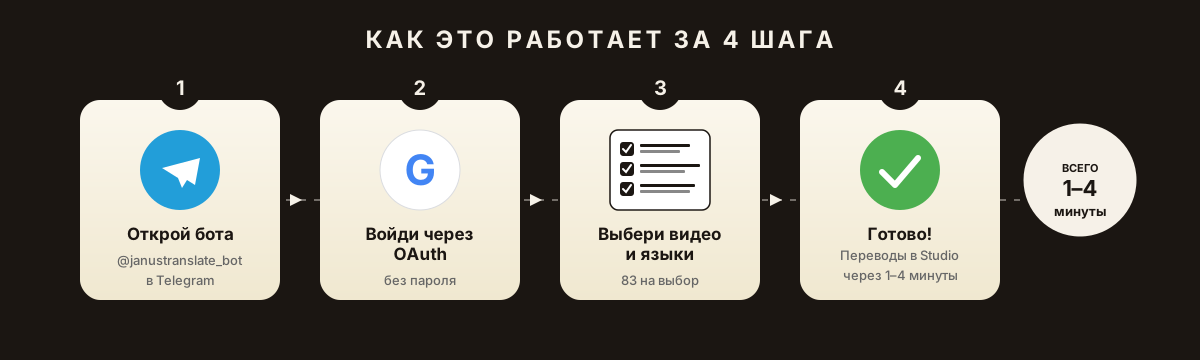
- Open @janustranslate_bot in Telegram
/start→ authorize via Google OAuth (Google will request the bot's permission to read your video list and publish translations. Safe – password not transferred.)- Pick a channel (if you have multiple)
- Pick videos (can be 5-10 at once)
- Pick languages (e.g., English + German + Spanish)
- Pick mode: Express, AI Lite (recommended), Smart, or Premium AI
- Bot shows price → "5 videos × 3 languages = 240 credits = $1.10"
- Confirm → bot publishes translations to Studio in 5-15 minutes
- Verify in Studio → Subtitles → see all languages in list
Option B: Manually (if you have 1-2 videos)
- Download original SRT from Studio
- Translate via DeepL or ChatGPT
- Save as
name_en.srt - Studio → Subtitles → Add language → upload SRT
- Go to "Title and description" → paste translation
- Save
Time: 30-60 minutes per video per 1 language.
Step 5. Measuring results in 30 days
Track in Studio → Analytics:
| Metric | Where | Expected norm |
|---|---|---|
| Share of views from new regions | Audience → Geography | Should grow 2-10x in 30 days |
| Translated subtitle usage | Content → Subtitles → specific video | 5-30% of new-language viewers turn on subs |
| CTR from recommendations in new countries | Reach → Sources | Should be 2-8% |
| Retention in new language | Audience → Retention (filter by language) | Should be >50% |
| RPM (revenue per 1000) overall | Revenue → RPM | Should grow |
Top mistakes during localization
❌ Mistake 1. Using only built-in YouTube auto-translate
Auto-translate in player is not indexed and doesn't help the algorithm. This is the most useless method.
❌ Mistake 2. Translating title only, not subtitles
Viewer clicks German title → sees Russian audio without translation → leaves in 5 seconds. Retention drops to zero, algorithm stops showing.
❌ Mistake 3. 10 languages immediately
Stretches budget, can't tell which language works. Start with 2-3.
❌ Mistake 4. Using Google Translate in 2026
Quality for many language pairs is noticeably worse than DeepL and AI translators (GPT-4, Claude, Gemini). Especially bad with idioms and niche terms.
❌ Mistake 5. Not translating the description
Description = where most SEO signals live. Without description translation, your video won't appear in YouTube search in the new language.
Bottom line: what to do this week
Today (5 min):
- Open Studio → Analytics → Audience → Languages
- Note top 3 non-primary languages with >0.5% share
Tomorrow (30 min):
- Pick 5 videos with best retention from last 60 days
- Launch @janustranslate_bot → connect channel
The day after (1 hour):
- The 100 demo credits are for Express. AI modes unlock after the first top-up; usage depends on the selected actions and languages.
- Buy Basic pack ($15) if you want all 5 videos at once
In 30 days:
- Check Studio → Analytics. If growth – translate the rest. If not – contact support, we'll review for free.
Start localizing your channel today
The bot will translate top 5 videos into 2-3 languages in 5 minutes – no YouTube Studio, no timecode editing. 100 credits to start.
🚀 Launch @janustranslate_botCurrent JanusTranslate features. New users can claim 100 demo credits for Express; AI modes unlock after the first top-up. Get translated titles and descriptions as TXT without connecting a channel. Publishing translations and translating an available source caption track require connecting your own YouTube channel through OAuth. Dubbing is currently in private testing.